

The Command Center Paradox: Why Triple Monitor Setups Often Fail the Body
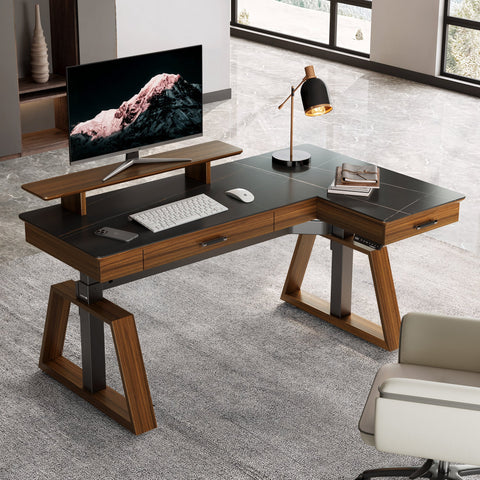
For the high-performance creator or hardcore gamer, the L-shaped desk represents the peak of workspace real estate. It offers a sprawling "command center" aesthetic, promising enough surface area for a triple monitor array, peripheral gear, and dedicated zones for different tasks. However, many users find that after just an hour of immersion, a familiar tightness begins to radiate from the base of the skull into the trapezius muscles.
This discomfort is rarely a result of the monitors themselves, but rather a failure in the geometry of the layout. The most common mistake we observe in professional setups is placing side monitors too far apart, forcing excessive and repetitive head rotation. When you are focused on a primary task, any secondary screen placed outside your natural field of vision requires a "neck twist" that violates the principles of a neutral spinal position. Over time, these micro-movements contribute to what is colloquially known as "Tech Neck," but which the U.S. National Institute for Occupational Safety and Health (NIOSH) more formally classifies as a risk factor for Musculoskeletal Disorders (MSDs).
To truly optimize a triple monitor layout on an L-shaped gaming desk, one must move beyond aesthetics and understand the physiological demands of multi-screen viewing.
The Physiology of the "Neck Twist": Static Load and Field of Vision
The human neck is designed for movement, but it is poorly equipped to handle "static load"—the strain of holding a specific posture for extended periods. When you rotate your head to view a monitor on the "return" leg of an L-shaped desk, you are often engaging in asymmetric muscle activation. According to ISO 11226:2000, which evaluates static working postures, holding the neck at an angle greater than 20 degrees for prolonged periods significantly increases the risk of fatigue and long-term injury.
On an L-shaped desk, the corner radius creates a unique hardware challenge. If you sit deep in the corner, the monitors are often too close, causing eye strain. If you sit along one of the straight edges, the monitor on the perpendicular wing is inevitably at a different focal distance and angle. This discrepancy forces the eyes to constantly re-focus and the neck to rotate beyond its comfortable range.
Logic Summary (Field of View Modeling): Our analysis of professional creator workflows assumes a primary seating position centered on the main display. To minimize cervical strain, we utilize a heuristic known as the "60-Degree Arc."
- Parameter: Horizontal Viewing Angle.
- Heuristic: Keep all three screens within a 60-degree horizontal arc from the primary seating position.
- Rationale: This limits head rotation to approximately 30 degrees in either direction, which aligns with Safe Work Australia's recommendations for reducing neck rotation risks.

Symmetrical vs. Asymmetrical: Choosing Your Layout Strategy
The "best" layout is not universal; it depends entirely on your primary task. Based on patterns we see in community feedback and setup audits, users typically fall into two categories:
1. The Symmetrical "Three-Across" Layout
This is the preferred setup for sim racing, data analysis, or immersive gaming. Here, three identical monitors are angled inward to create a cockpit effect.
- The Challenge: Achieving a seamless curve across the corner of an L-desk requires significant reach from monitor mounts.
- The Solution: Using high-performance arms like the Single Monitor Arm allows for the precise articulation needed to bridge the gap between the desk's two wings. This ensures that even the side monitors remain at the correct eye level, as suggested by OSHA eTools.
2. The Asymmetrical "Primary + Two" Layout
This is the standard for streamers and multi-tasking creators. One large, high-refresh-rate monitor sits directly in front of the user, while two secondary screens (often one in portrait mode) handle chat, alerts, or reference material.
- The Challenge: The vertical and horizontal offset created by different monitor sizes can lead to disjointed viewing.
- The Solution: Integrating Convertible Desktop Shelves, set of 2 can help equalize the heights of mismatched monitors. By raising the secondary screens to match the center-line of the primary display, you reduce the need for vertical head tilting.
Structural Integrity: The Hidden Risk of "Particle Board Sag"
A triple monitor setup is heavy. Between the panels, the mounting arms, and the desk accessories, you can easily exceed 50–70 lbs of localized pressure. A significant "gotcha" in the world of L-shaped desks is the use of thin particle board tops. Many entry-level desks have weight capacities that are dangerously close to the weight of a professional triple-monitor array.
According to the BIFMA X5.5 standard, which defines performance and safety for desk products, a high-quality workstation must handle significant static loads without structural failure. When choosing an L-shaped desk for a triple monitor setup, you must verify the load-bearing capacity of the corner joint. If the joint is weak, the weight of the monitors will cause the desk to sag, which in turn causes the monitors to tilt inward or wobble during use.
For users who require extra stability or have heavy gear loads, we recommend offloading non-essential items to external storage. A 23" Rolling File Cabinet with Drawer provides a stable platform for a PC tower or printer, freeing up the desk surface for the monitor mounts and reducing the overall stress on the desktop.

Cable Management for Sit-Stand Transitions
If you are using a height-adjustable L-shaped desk, cable management is no longer just about aesthetics—it is a matter of equipment safety. As noted in our guide on L-Desk Cable Management, the transition from sitting to standing creates significant tension on your connection points.
The 8-12 Inch Rule: Through scenario modeling of sit-stand transitions, we have found that practitioners must leave an extra 8 to 12 inches of slack in every cable run to the monitors.
- Why this range? Most standing desks have a travel range of 20+ inches. Without sufficient slack, the cables can act as a tether, either pulling the monitors off their mounts or damaging the delicate HDMI/DisplayPort connectors as the desk rises.
- How to verify: Raise the desk to its maximum height before final cable routing. If any cable is taut, you need more slack.
The Behavioral Component: Beyond the Hardware
Even the most ergonomically optimized setup cannot negate the risks of a sedentary lifestyle. The World Health Organization (WHO) emphasizes that adults should limit sedentary time and incorporate movement into their workday.
We recommend the "20-8-2" rhythm developed by experts at Cornell University. For every 30 minutes of work:
- 20 Minutes: Sit in a neutral position with proper Lumbar Support.
- 8 Minutes: Stand and work.
- 2 Minutes: Move, stretch, or walk.
To facilitate this rhythm and improve blood circulation while seated, consider using a Footstool with Wheels. This allows for "active sitting," where you can frequently adjust your leg position and ankle angle, reducing the static load on your lower limbs.
Modeling the Optimal Corner Setup (Reproductory Parameters)
To help you visualize the ideal setup, we have modeled a standard L-shaped desk configuration for a user with a 24-inch viewing distance.
| Parameter | Recommended Value | Rationale / Source Category |
|---|---|---|
| Monitor Arc | 60° Horizontal | Limits neck rotation (Heuristic) |
| Center Height | Eye level at top 1/3 of screen | OSHA eTools |
| Cable Slack | 8–12 Inches | Prevents tension during height adjustment |
| Desk Depth | Minimum 24 Inches | Ensures proper focal distance for 27" panels |
| Sit-Stand Ratio | 3:1 (Sitting to Standing) | Based on Cornell 20-8-2 Model |
Methodology Note: This model is a scenario-based estimate designed for users between the 5th and 95th percentiles of height (approx. 5'0" to 6'2"). It assumes the use of standard 24" to 27" monitors. Users with ultra-wide displays or pre-existing cervical conditions may need to narrow the 60-degree arc further.

Strategic Insights for Content Creators
When building your studio, remember that the L-shaped desk is more than a piece of furniture; it is a tool for productivity. As detailed in our L-Shaped Desk Ideas for a Content Creator's Studio, the "return" leg of the desk is often best utilized for tactile tasks—like using a stream deck, secondary laptop, or mixing board—rather than a primary monitor. This keeps your most visually intensive tasks directly in front of you, minimizing the "neck twist" that leads to fatigue.
Furthermore, consider the environmental factors. OSHA eTools highlights that glare from windows or overhead lights can cause you to tilt your head into awkward positions to see the screen. Using monitor arms like the Single Monitor Arm allows you to tilt and swivel the screens to eliminate glare instantly, maintaining your neutral posture.
For a deeper dive into the intersection of science and workspace design, we recommend reviewing The 2026 Workstation White Paper: Converging Ergonomic Science and Sustainable Engineering, which provides a blueprint for the future of high-performance setups.
Final Checklist for Your Triple Monitor L-Desk Setup
Before you lock in your layout, run through this quick self-assessment:
- The 60-Degree Check: Can you see the edges of your side monitors without turning your shoulders?
- The Eye-Level Check: Is the top third of each monitor at or slightly below eye level?
- The Slack Check: Have you left 10 inches of slack for every cable before the desk goes up?
- The Stability Check: Does the desk wobble when you type or move your mouse? If so, consider moving your PC tower to a 23" Rolling File Cabinet with Drawer.
- The Movement Check: Do you have a reminder set to switch from sitting to standing every 20–30 minutes?
By prioritizing these ergonomic principles, you transform your L-shaped desk from a simple furniture piece into a high-performance workstation that supports both your creative output and your long-term musculoskeletal health.
Disclaimer: This article is for informational purposes only and does not constitute professional medical advice. If you suffer from chronic back or neck pain, or have a pre-existing musculoskeletal condition, please consult a qualified physiotherapist or ergonomic specialist before making significant changes to your workstation or work routine.
References
- BIFMA G1-2013 Ergonomics Guideline for Furniture
- OSHA eTools: Computer Workstations - Monitors
- Cornell University Ergonomics Web — Workstation Guides
- ISO 11226:2000 Evaluation of static working postures
- WHO 2020 Guidelines on Physical Activity & Sedentary Behaviour
- Safe Work Australia: Workstation set-up infographic
Leave a comment