


Aging in place furniture should make sitting down, standing up, and daily adjustments easier, not more complicated. The best fit depends on transfer effort, room layout, and whether the user needs a desk or chair that can be reached and used without twisting or overreaching.

What Makes a Home Office Safer
For older adults and adult children planning a home office, the first question is simple: does the furniture reduce effort during the most common movements? In practice, that means easier sit-to-stand transfers, stable support under load, and controls that do not require awkward reaching.
The National Institute on Aging's home fall-prevention guidance emphasizes reducing clutter, improving access, and avoiding unnecessary risk during everyday movement. For furniture buyers, that translates into avoiding low seats, unstable bases, and layouts that force a person to twist for controls or push off from a bad angle.
A useful decision sentence is this: if a chair or desk looks attractive but makes standing up, turning, or reaching harder, it is not a good aging in place furniture choice for daily use. Another is that the safer setup is usually the one that keeps the user independent for routine tasks, even if it gives up some style points or extra features.
The Science of Seating: How Ergonomics Protect Your Spine can help with general seating basics, but transfer safety needs a stricter filter. Spine comfort matters; safe movement and reachable controls matter first.
Choose Desk Features That Reduce Strain
An ergonomic desk for seniors with mobility issues should make the work surface easier to reach in the positions the user actually uses. That usually means a height range that fits seated paperwork and computer work, plus a standing range if the user wants to alternate positions during the day.

For many buyers, the biggest mistake is focusing on finish or shape before checking adjustment range. If the desk sits too high while seated, the shoulders creep up. If it sits too low, the user leans forward and reaches more than they should. In both cases, the setup can become tiring faster than expected.
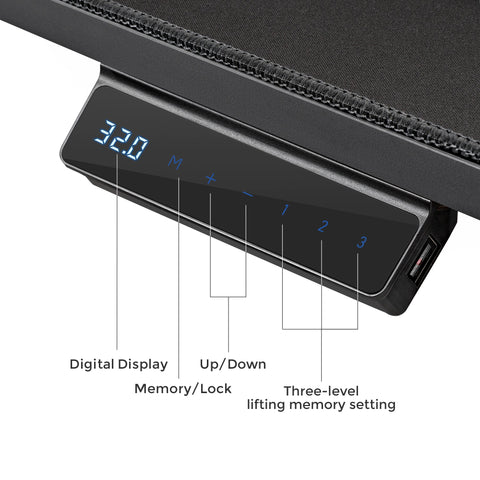
The desk also needs accessible controls. Programmable presets matter when the user does not want to fine-tune height every day, especially if sitting and standing positions are repeated. A stable frame is equally important, because wobble can make small tasks feel less secure.
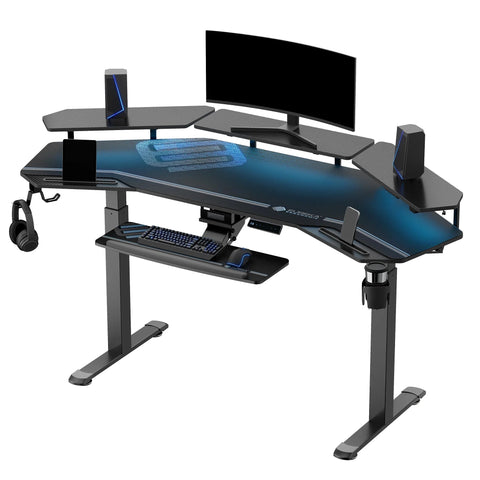
If you want a product-side example to compare against those needs, the Ark Pro L-Shaped Standing Desk is a useful check point because its adjustable range and presets show the kind of desk behavior that can support repeated home-office changes. For browsing similar options, the Standing Desks collection is the broader place to compare layouts.
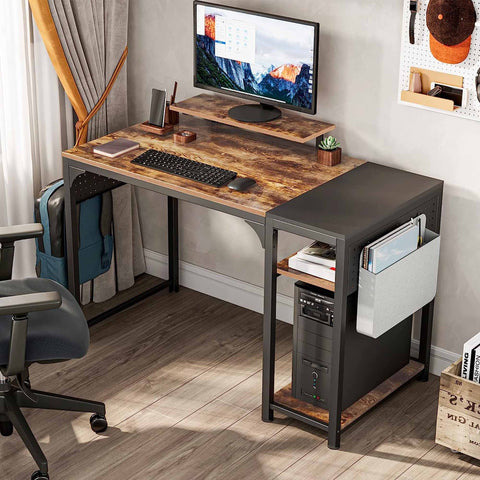
In real rooms, the decision flips when the space is tight. A large desk can still be a poor fit if cable paths, monitor depth, and printer or paperwork storage force the user to reach across clutter. For a compact apartment or den, choose the smaller setup that keeps the controls, keyboard, and daily items easy to reach.
Height Range and Easy Adjustment
Height adjustability is not just a comfort feature. It changes whether the desk can support both seated and standing use without forcing the user into shoulder elevation or forward lean. For aging in place furniture, that is a practical boundary, not a luxury.
Stable Frame and Quiet Movement
A desk that moves smoothly and stays stable is easier to trust during everyday use. Quiet motion matters less than safety and consistency, but both help when the user adjusts the surface often.
Controls, Memory Presets, and Reach Distance
Controls should be reachable without stretching across the desktop. Presets help when repeated changes are part of the routine, since they reduce the number of steps needed during the day.
Surface Layout for Small Spaces and Daily Tasks
Check whether the desktop can hold a monitor, keyboard, paperwork, and any assistive accessories without crowding. If the surface is too shallow, the user may end up leaning forward or stacking items in a way that makes the setup harder to use.
Pick Chair Features That Support Transfers
A chair for aging in place should make the sit-to-stand motion feel more controlled. Seat height is the first spec to check, because a seat that is too low can make rising harder, while a seat that is too high can leave the feet unsupported.
Older-adult chair-rise studies in PubMed show that seat height affects how easily people stand up from a chair, which is why this spec matters more than decorative styling. In plain terms, the right seat height should let the user keep feet planted and use the arms only as help, not as the only way out of the chair.
Armrests can improve leverage, but they should not block the user from getting close enough to the desk. A sturdy base and a weight capacity with comfortable margin are also important, because the goal is stable, repeatable use rather than a chair that feels impressive in a product photo.
For a product example, the Hoss, Big & Tall 500LBS Capacity Ergonomic Office Chair shows how a higher-capacity chair can fit the transfer-focused buyer who needs more structural margin. If you are comparing chair categories instead of one model, the Office Chairs & Gaming Chairs collection is the broader shopping path.
A chair can still be a poor fit if it is very soft, sinks too low, or has armrests that interfere with the desk edge. That is the key not-a-fit filter: if the user cannot rise with reasonable effort and keep a stable posture, keep shopping.
| Chair Feature | Why It Matters For Aging In Place | What To Check |
|---|---|---|
| Seat Height | Affects how much effort it takes to stand | Feet flat, knees supported, no forced reach to push off |
| Armrests | Adds leverage during transfers | Easy to use, but not so wide that they block desk access |
| Base Stability | Helps the chair feel secure in daily use | Solid base, no obvious wobble, capacity with margin |
| Cushion Firmness | Influences whether the seat stays usable over time | Supportive enough that the user does not sink too low |
Seat Height and Foot Placement
Seat height should support a natural standing motion. If the user's feet dangle or the knees sit much higher than the hips, the transfer usually gets harder.
Armrests That Help Instead of Block
Armrests are useful when they provide leverage. They are less useful when they push the user too far from the desk or make side-entry and exit awkward.
Cushioning That Stays Supportive
The seat should stay supportive during longer sessions. Very soft cushioning can feel nice at first, but it may lower the user into a position that makes standing up less comfortable.
Add Safety Details Around the Furniture
Aging in place furniture works better when the surrounding setup is simple. The desk or chair may be solid, but cords, narrow walking paths, and awkward accessory placement can still create daily friction.
For office setups, the CDC's Check For Safety home checklist is a good reminder to keep commonly used items easy to reach and to remove avoidable trip hazards. That is why cable management matters. A clean floor area makes it easier to reposition a chair, walker, or footrest without catching a cord.
If the seated position leaves the feet unsupported, a footrest can improve the fit. The Footstool with Wheels is a relevant example because it shows the kind of adjustable support that may help in a home office, especially when the chair height and desk height need a little extra balancing. For a broader category view, the Footrests collection is the browsing path.
The other practical issue is delivery and setup. Heavier furniture often needs help moving, unpacking, or placing, so plan for that before checkout. If the buyer will struggle with assembly or placement, the product may look easy online but become frustrating on arrival.
Don't Forget This! Your New WFH Desk Setup Checklist is useful if you want a broader room-and-cable checklist after choosing the furniture.
Cable Management and Floor Clearance
Loose cords can get in the way of chair movement or walking paths. Keep them out of the main traffic zone and check that the chair can roll or turn without snagging.
Foot Support and Accessory Placement
If a chair fits the user only when the feet are not fully planted, add a footrest rather than forcing the user to adapt to a poor position. The support should make the setup simpler, not busier.
Delivery and Assembly Planning
Large items may arrive curbside or at a ground-level drop-off point. Before buying, confirm who can move the box, who can assemble it, and whether the room path is wide enough.
Use a Home Assessment Before You Buy
A home assessment keeps the decision grounded in the actual room, not just the product page. Measure first, then compare furniture. If the room does not support the footprint or the user cannot reach key controls, the wrong product will create a daily nuisance.
The AARP HomeFit Guide is helpful background for thinking about accessibility, room fit, and easier movement at home. For desk shoppers, A Checklist for Measuring Your Room for a Desk is a natural next step after you measure the space.
Use this checklist before you add aging in place furniture to the cart:
- Measure the seated height, standing height, and clear floor space.
- Check whether the user can reach controls, drawers, and armrests without twisting.
- Confirm the furniture footprint leaves enough walking and turning room.
- Review delivery, assembly, and placement help before ordering.
- Match the setup to the user's daily routine, including computer work, paperwork, and rest breaks.
If any step fails, keep looking. The best choice is the one the user can operate comfortably every day, not just the one with the strongest feature list.
Related Resources
- Lumbar Support Guide for Ergonomic Chairs
- The Role of Lumbar Support in All-Day WFH Comfort
- How to Use Recline and Tilt Lock for Active Sitting
FAQs
Q1. How Tall Should a Senior-Friendly Desk Be?
There is no single correct number because the right desk height depends on the user's seated posture, arm position, and whether the desk will also be used standing. The practical test is whether the shoulders stay relaxed and the keyboard, paperwork, and controls are easy to reach without leaning forward.
Q2. What Seat Height Is Easiest for Standing Up?
The easiest seat height usually lets the feet stay flat on the floor and the knees rest near a natural bend, so the user can push up without sliding forward first. If the chair feels low, soft, or unstable, transfer effort usually rises.
Q3. Can a Lift-Assist Recliner Replace a Mobility Aid?
No. Furniture can make transfers easier, but it should not be treated as a medical device or a replacement for professional mobility guidance. If standing remains difficult or unsafe, the buyer should look at the furniture only as one part of a broader home setup.
Q4. What Chair Specs Matter Most in a Small Apartment?
Prioritize footprint, turning space, seat height, and whether the chair leaves enough room for a walker, cane, or side table if needed. In a tight room, compact size is only helpful if it does not make the transfer or reach pattern worse.
Q5. Why Does Weight Capacity Matter for Aging in Place Furniture?
Weight capacity can be a rough indicator of structural margin and long-term durability. A comfortable buffer above expected use is usually smarter than buying right at the limit, especially when the furniture will see daily transfers and repeated movement.
Make the Room Work Before You Make the Purchase
The safest aging in place furniture choice is the one that fits the person, the room, and the routine together. Measure the space first, confirm reach and transfer ease, then select pieces that keep daily movement simple. If any element creates friction, adjust the layout before buying.





Leave a comment