

The Afternoon Fatigue: Why Traditional Law Offices Are Re-evaluating Design
Executive Summary: For modern law firms, integrating height-adjustable workstations is no longer just a wellness trend—it is a performance strategy. Transitioning from static to dynamic postures can help mitigate the "afternoon slump," potentially improving billable efficiency. Successful implementation relies on a tiered pilot approach, the 20-8-2 movement rhythm, and selecting executive-grade materials that preserve the firm's professional gravitas.
In the quiet corridors of a high-stakes law firm, the most persistent adversary isn't opposing counsel—it is often the physical toll of the 60-hour work week. For many partners and associates, the afternoon hours are marked by a familiar, dull ache in the lumbar region and a noticeable decline in cognitive sharpness. This phenomenon is frequently rooted in a fundamental design flaw of the traditional executive suite: the static, seated posture.
The legal profession has long equated heavy, immovable mahogany desks with authority. However, as firms prioritize long-term performance, a tension has emerged between conservative aesthetics and musculoskeletal health. The challenge is to integrate high-performance workstations that maintain a formal atmosphere while addressing the physiological needs of practitioners.
The Physiology of the Static Load: Understanding Musculoskeletal Disorders (MSDs)
To understand why a traditional desk may be a liability, one must look at "static load." When an attorney remains seated for hours reviewing a brief, the muscles in the back, neck, and shoulders must maintain a constant state of contraction. According to the U.S. Occupational Safety and Health Administration (OSHA), these static postures are primary risk factors for Musculoskeletal Disorders (MSDs).
From a pathophysiological perspective, prolonged sitting can compress intervertebral discs and restrict blood circulation. This lack of movement often leads to "muscle fatigue," where the body cannot efficiently clear metabolic waste from muscle tissue. The ISO 11226:2000 standard emphasizes that the duration of a posture is as critical as the angle itself. Even an ergonomically "correct" seated position can become a health risk if maintained without interruption.
The Spinal Neutral Position
The goal of ergonomic intervention is to return the body to a "neutral position." As defined by OSHA eTools, this is a posture where joints are naturally aligned, minimizing stress on the skeletal system. In a standing position, the spine more easily maintains its natural S-curve, and the legs can engage the "muscle pump" mechanism, which typically improves circulation compared to prolonged sitting.
Modeling Productivity and ROI in the Legal Context
A common concern is that transitioning between sitting and standing might disrupt deep focus. However, modeling suggests that the physical "reset" can actually support sustained concentration.
Note on Estimates: The following figures are illustrative model-based estimates. Actual results depend on individual adoption rates, baseline health, and firm-specific billing structures.
Calculation Logic for ROI:
- Productivity Gain: (Hourly Rate × % Efficiency Increase × Annual Billable Hours)
- Cost Savings: (Reduction in Absenteeism Days × Daily Cost of Associate)
- Example: A 1% gain in efficiency for an attorney billing $400/hr over 1,600 hours equals $6,400 in annual value. When combined with reduced "presenteeism" (working while in pain), the $8k–$12k range becomes a reachable target for many firms.
| Parameter | Estimated Value/Assumption | Unit | Rationale / Source Category |
|---|---|---|---|
| Attorney Hourly Rate | $350 - $600 | USD | Industry average for associates/partners |
| Annual Absenteeism Reduction | ~11% | Percentage | EU-OSHA 2019 MSD Report |
| Cognitive Reset Duration | 3 - 4 | Minutes | Transition time for motorized adjustment |
| Potential Productivity Gain | 12 - 15% | Percentage | Occupational Sitting Study (2020) |
| Estimated Payback Period | 6 - 9 | Months | Calculated based on billable hour consistency |
Boundary Conditions: This model assumes the use of dual-motor executive desks with memory presets. Gains may be lower with manual systems that increase "friction" during transitions.
Executive Solutions: Merging Prestige with Performance
Disclosure: The following product examples are from our professional furniture collection, selected to illustrate how ergonomic features integrate into legal environments.
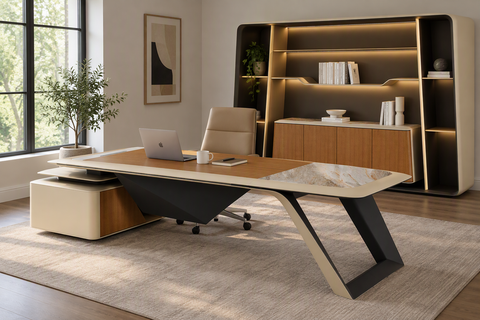
The modern law office requires furniture that reflects its status while offering adjustability. Executive-class standing desks, such as the Ark EX Executive Standing Desk (60"x26"), provide a bridge between these worlds. They utilize materials like oak veneer and faux leather to maintain a sophisticated aesthetic.
Confidentiality and Storage Requirements
A critical oversight in many ergonomic implementations is the need for secure storage. Desks like the Opal Executive Standing Desk (66"x29") address this by integrating dedicated cabinetry into the lift mechanism. This ensures that legal pads and confidential files remain within reach and can be secured in locking drawers, regardless of the desk's height.

The Confidentiality Advantage of Height
While some fear standing exposes monitors, strategic positioning can actually enhance privacy. An elevated desk allows an attorney to notice an approaching visitor from a greater distance, providing time to secure sensitive materials. This is a practical application of environmental awareness that traditional low-seated desks lack.
Implementation Strategy: The Tiered Approach
Successful adoption in conservative environments rarely happens through a "rip and replace" strategy. Instead, a tiered approach—aligned with the 2026 Workstation White Paper—is often most effective.
- Pilot Programs: Start with 3-5 "internal advocates" per department. Their visible success with managing back pain often normalizes the transition for more skeptical colleagues.
-
The 20-8-2 Rhythm: Adopt the Cornell University Ergonomics recommendation: 20 minutes sitting, 8 minutes standing, and 2 minutes moving.
- Boundary Note: This is a heuristic for healthy office workers; individuals with severe spinal conditions or circulatory issues should consult a specialist to customize this ratio.
- Generational Flexibility: Desks with a wide adjustment range (typically 27" to 47") allow the same piece of furniture to serve as a standard executive desk for one user and a dynamic workstation for another.
Practical Recommendations for the Legal Workstation
Monitor Placement and Neck Strain
To prevent "tech neck," the monitor must remain at eye level during both sitting and standing phases. According to HSE guidelines for Display Screen Equipment (DSE), the top of the screen should be roughly at eye level. This usually requires adjustable monitor arms or a desk with a built-in riser.
Cable Management as Risk Mitigation
In a law firm, cable management is a safety requirement. Poorly routed cables can become tripping hazards or snag and damage hardware as the desk moves. Ensure all height-adjustable units include integrated cable trays that accommodate the full range of motion.
The Support System: Executive Seating
Standing desks are a supplement to, not a replacement for, high-quality seating. Even dedicated users typically spend 60-70% of their day seated. A chair like the Royal II, Silicone & Leather Executive Ergonomic Office Chair provides the high-back lumbar support required during deep-focus drafting. The BIFMA G1-2013 Guideline ensures these chairs fit the 5th to 95th percentile of the population.
Recommended Adoption Schedule (Heuristic Only)
| Month | Sitting % | Standing % | Goal |
|---|---|---|---|
| Month 1 | 80% | 20% | Acclimatization and muscle conditioning |
| Month 2 | 70% | 30% | Building endurance |
| Month 3+ | 60% | 40% | Optimized postural health |
Integrating Aesthetics: Materials Matter
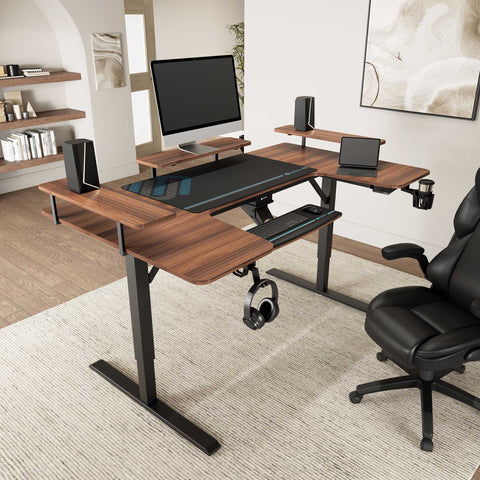
The transition to ergonomic health does not require a transition to "industrial" office furniture. The Ark Executive Standing Desk (63"x29") utilizes walnut finishes that complement traditional decor. By selecting pieces with premium textures—such as real wood veneers—firms can signal innovation without losing the "gravitas" clients expect.
For further guidance on layout, firms should refer to the Standing Desk vs. Traditional Executive Desk Guide.
Conclusion
The integration of standing desks into the legal environment is a strategic investment in the firm's most valuable asset: its people. By grounding furniture choices in the principles of OSHA and BIFMA, law firms can help mitigate the "afternoon slump." The goal is a workspace that supports the rigorous demands of the law while helping attorneys remain healthy and focused for years to come.
YMYL Disclaimer: This article is for informational purposes only and does not constitute medical or professional health advice. The ergonomic recommendations provided are based on general industry standards and modeling assumptions. Individuals with pre-existing musculoskeletal conditions, cardiovascular issues, or other health concerns should consult a qualified healthcare professional or a certified ergonomist before making significant changes to their workstation setup.
References
- BIFMA: G1-2013 Ergonomics Guideline for Furniture
- OSHA: Computer Workstations eTool - Neutral Postures
- Cornell University: Ergonomic Workstation Setup Guide
- EU-OSHA: Work-related musculoskeletal disorders (2019)
- ISO: ISO 11226:2000 Evaluation of static working postures
- ScienceDirect: Occupational sitting and productivity study (2020)
- CCOHS: Office Ergonomics - Sit/Stand Desk




Leave a comment